My work Laptop had a problem with Fedora 10, I was not able to start the X graphical environment. After a quick Google search I found the solution at Adobro Online.
Basically, the X-server gets confused because of the two graphic cards in the Laptop. Just disable the "Switchable Graphics" option in the BIOS ("Display" section) and select e.g. the "discrete" graphics as default and you are good to go. It though seems that the ATI graphics driver does not yet support graphic acceleration features, so you might want to switch to the "integrated" graphics card if you need the extra acceleration.
Wednesday, January 21, 2009

Wednesday, January 14, 2009
Re-encoding unplayable (in Quicktime) ASF files
I recently got some ASF files that were not able to be played (only audio, no video) in Quicktime using the Flip4Mac WMV plugin. The files though played fine in VLC, but I prefer to watch them using Frontrow.
The ASF files can be re-encoded using VLC:
The ASF files can be re-encoded using VLC:
- Use the "Streaming/Exporting Wizard..." from the "File" in VLC
- Select "Transcode/Save to file" and click "Next"
- Select the file you want to re-encode using "Choose..." or an existing playlist item
- Enable "Transcode video" with "WMV 2" as "Codec" and e.g. "1024" as "Bitrate (kb/s)", also
- enable "Transcode audio" with "MP3" as "Codec" and e.g. "128" as "Bitrate (kb/s)", then click "Next"
- Select "ASF" as "Encapsulation format" and click "Next"
- Click "Choose", enter you preferred destination file name and directory, then click "Next"
- In the "Summary" click "Finish" and wait until the progress bar in the controller window moved to the right side
- Enjoy the re-encoded ASF in Quicktime
Tuesday, January 13, 2009
EPS QuickLook Plugin for Mac OS X Leopard 10.5
Since I often use Encapsulated Postcript files, I find the EPSQuickLookPlugIn quite handy.
Monday, January 12, 2009
Core Image benchmark comparison (Geforce 7600GT, Geforce 9600GT and Radeon 3850)
I use my Macs and OSX86 machines also for photo editing with Aperture. The Apple Pro-Apps (Aperture, Finalcut, etc.) rely on Core Image and therefore profit heavily from a fast graphics card in the system.
To compare different models of systems and graphics cards, I made some comparison benchmarking tests using iMaginator 4 (trial version).
The test consists of exporting a morphing movie of 1000 frames, which contains all transition effects in the order they are listed in the selection pane (see below) using the two default images (leopard and rose) as source and destination for the morphing.
These were the "Transisions" used (top to down):
 And I changed the following preferences (only changed # Frames to 1000):

Then I saved the movie using "Save to Movie" from the "File" menu, started the stop watch when I clicked the "Save" button, moved the mouse, so the cursor went to the "Beachball". Then I waited until the cursor turned back to the normal pointer and stopped the stop watch.
These were the results on Mac OS 10.5.5 (faster = better):
iMac G5 2.0 GHz ATI X800: 6m50s
iMac C2D 2.33 GHz Geforce 7600 GT: 2m14s
OSX86 C2Q 2.66 GHz ATI Radeon 3850: 1m22s
OSX86 C2Q 2.83 GHz Geforce 9600GT: 1m21s
I was surpised to see the Geforce 9600GT perform that fast, although that configuration is slightly faster and has more cache for the CPU than the one with the Radeon 3850. But I guess it is safe to say that the Geforce 9600GT is not such a bad choice for Core Image intensive apps. I think a Radeon 3870 would probably out-perform the Geforce 9600GT. Maybe a Geforce 9800GT could be faster than a Radeon 3870, but unfortunately I can't test that since I do not have these graphics cards at hand.
In a later post I might add more details about the system configurations and maybe will also put some tests done regarding OpenGL performance of the same systems (where the Geforce 9600GT also scored better than the ATI Radeon 3850).
To compare different models of systems and graphics cards, I made some comparison benchmarking tests using iMaginator 4 (trial version).
The test consists of exporting a morphing movie of 1000 frames, which contains all transition effects in the order they are listed in the selection pane (see below) using the two default images (leopard and rose) as source and destination for the morphing.
These were the "Transisions" used (top to down):
Then I saved the movie using "Save to Movie" from the "File" menu, started the stop watch when I clicked the "Save" button, moved the mouse, so the cursor went to the "Beachball". Then I waited until the cursor turned back to the normal pointer and stopped the stop watch.
These were the results on Mac OS 10.5.5 (faster = better):
iMac G5 2.0 GHz ATI X800: 6m50s
iMac C2D 2.33 GHz Geforce 7600 GT: 2m14s
OSX86 C2Q 2.66 GHz ATI Radeon 3850: 1m22s
OSX86 C2Q 2.83 GHz Geforce 9600GT: 1m21s
I was surpised to see the Geforce 9600GT perform that fast, although that configuration is slightly faster and has more cache for the CPU than the one with the Radeon 3850. But I guess it is safe to say that the Geforce 9600GT is not such a bad choice for Core Image intensive apps. I think a Radeon 3870 would probably out-perform the Geforce 9600GT. Maybe a Geforce 9800GT could be faster than a Radeon 3870, but unfortunately I can't test that since I do not have these graphics cards at hand.
In a later post I might add more details about the system configurations and maybe will also put some tests done regarding OpenGL performance of the same systems (where the Geforce 9600GT also scored better than the ATI Radeon 3850).
Make extended print dialog in Mac OS X show by default
In Terminal.app enter the following line:
to undo, replace
via tuaw.com
defaults write -g PMPrintingExpandedStateForPrint -bool TRUEto undo, replace
TRUE with FALSEvia tuaw.com
Sunday, January 11, 2009
Possible Sigma lenses for my Nikon D80
I have been looking at some possible Sigma lenses, which would nicely fit to my Nikon D80. So far I only use super zooms from Nikon (18-200mm VR and 70-300mm VR), which unfortunately have not very low starting aperture. I also use a fix 50mm f/1.8 lens from Nikon.
The following Sigma lenses caught my eye:
Sigma 24-70mm, f/2.8 EX DG Asp. Makro, Nikon
at Digitec for CHF 550.--

or the newer "updated" Sigma 24-70mm, f/2.8 EX DG HSM, Nikon
at fotovideoplus.ch for CHF 659.-- (not yet avail.)
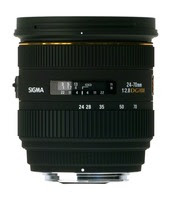
Sigma 70-200mm, f/2.8 APO EX DG HSM II, Nikon
at Digitec for CHF 947.--

What I like about the Sigma lenses is that they are about one-third to half of the price of a corresponding Nikon lens, but according to some reviews still seem pretty valuable alternatives to the original Nikon ones. Personally, I can do fine without the Macro functionality, I rather would want to have a fast auto focus, therefore the HSM on the new updated 24-70mm is a plus. Although it might be slightly more expensive and my favorite so far, it is not yet available. The 70-200mm is kind of a no-brainer. So I guess I will have to start saving for those lenses or should try to get rid of my old Nikon super zooms. Although my Nikon 18-200mm is a very handy and useful lens, I'm not too happy about the quality of the photos (regarding sharpness and resolution). I now made some shots in Egypt with low ISO values and the VR (vibration reduction) turned off, but I still need to evaluate those regarding improved quality compared to using the lens with VR turned on.
Here are some reviews of the mentioned Sigma lenses:
70-200mm: dpreview, FM Reviews
old 24-70mm with Macro: the-digital-picture, FM Reviews
For the new 24-70mm HSM I found no review yet, but a news post on dpreview and some discussions.
The following Sigma lenses caught my eye:
Sigma 24-70mm, f/2.8 EX DG Asp. Makro, Nikon
at Digitec for CHF 550.--

or the newer "updated" Sigma 24-70mm, f/2.8 EX DG HSM, Nikon
at fotovideoplus.ch for CHF 659.-- (not yet avail.)

Sigma 70-200mm, f/2.8 APO EX DG HSM II, Nikon
at Digitec for CHF 947.--

What I like about the Sigma lenses is that they are about one-third to half of the price of a corresponding Nikon lens, but according to some reviews still seem pretty valuable alternatives to the original Nikon ones. Personally, I can do fine without the Macro functionality, I rather would want to have a fast auto focus, therefore the HSM on the new updated 24-70mm is a plus. Although it might be slightly more expensive and my favorite so far, it is not yet available. The 70-200mm is kind of a no-brainer. So I guess I will have to start saving for those lenses or should try to get rid of my old Nikon super zooms. Although my Nikon 18-200mm is a very handy and useful lens, I'm not too happy about the quality of the photos (regarding sharpness and resolution). I now made some shots in Egypt with low ISO values and the VR (vibration reduction) turned off, but I still need to evaluate those regarding improved quality compared to using the lens with VR turned on.
Here are some reviews of the mentioned Sigma lenses:
70-200mm: dpreview, FM Reviews
old 24-70mm with Macro: the-digital-picture, FM Reviews
For the new 24-70mm HSM I found no review yet, but a news post on dpreview and some discussions.
Saturday, January 10, 2009
Problems with Speed Download 4 and Safari when downloading RAR files
For a few weeks I now had the problem with Speed Download 4 and Safari when I wanted to download RAR files. I tried everything, uninstalling and reinstalling, disabling all other plugins (SafariStand, Glims, SafariAdBlock) but nothing helped, Safari always used its own download manager instead of handing the download to Speed Download 4.
Then I started to take a closer look at MIME types. Per default, the MIME type(s) setting for RAR archive in Speed Download 4 on my machine was
Then I started to take a closer look at MIME types. Per default, the MIME type(s) setting for RAR archive in Speed Download 4 on my machine was
application/x-rar-compressed, application/octet-stream. But I found a list with some more possible MIME types for RAR files. It finally worked again fine after completing the MIME type(s) setting for RAR archive in Speed Download to application/x-rar-compressed, application/octet-stream, application/rar, application/x-compressed, application/x-rar, compressed/rar. Now RAR file downloads are again intercepted by Speed Download 4.
Subscribe to:
Posts (Atom)